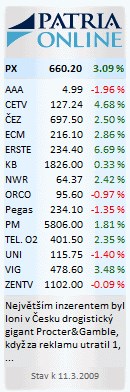
For users of Window Vista operation system, we have prepared a special sidebar gadget for free download. Patria Vista Gadget is a desktop mini-program allowing you to see the current PX Index status, online stock data from the Prague Stock Exchange (SPAD segment) and also hot news from www.patria.cz information server in the sidebar of your computer running Windows Vista.
Vista Gadget installation
1. Make sure you are using Windows Vista operation system
2. Click HERE to get the Patria Vista Gadget
3. Click OPEN
4. Click RUN
5. Click INSTALL
After a successful installation, the gadget starts to run automatically and it becomes part of the gadgets installed on your computer.
Application description: Windows Vista sidebar and desktop gadget
Windows Sidebar is a long, vertical bar that is displayed on the side of your desktop. It contains mini-programs called gadgets, which are customizable mini-programs that display continuously updated information and allow you to perform common tasks without opening a window. For example, you can display regularly updated weather forecasts, news headlines, a picture slide show, view continuously updated headlines, or look up contacts. It also offers standard office tools such calendar, calculator, clock etc., different entertainment applications such as simple games, picture browser or information about your computer and its components.
Sidebar can keep information and tools readily available for you to use. For example, you can display news headlines right next to your open programs. This way, if you want to keep track of what's happening in the news while you work, you don't have to stop what you're doing to switch to a news website. You may soon realize you don’t need to keep a calculator, a calendar and other things that just take up space on your desk.
The sidebar can be anchored on the desktop of your computer – you can set it so that other windows will not cover it. You can also view your gadgets by pushing the keys Windows + spacebar. Gadgets can also be dragged to your desktop and some gadgets thus gain extended functionality or display additional information in this mode.